Photopea is a web-based image editor that supports raster and vector graphics, enabling tasks like photo retouching, graphic design, and editing PSD, XCF, and Sketch files.
Photopea is a browser-based image editor that replicates many core capabilities of professional desktop design software directly in the web. It supports a wide range of file formats, including PSD, AI, XD, Sketch, XCF, RAW, PDF, and common image formats such as JPG, PNG, and SVG, making it suitable for working with existing design assets and multi-tool workflows. Users can perform advanced photo editing with layers, masks, adjustment layers, blending modes, smart objects, and filters, as well as non-destructive editing techniques.
The tool includes vector editing features such as shape tools, pen tools, paths, and text handling, enabling the creation of UI designs, web graphics, icons, and print layouts. Designers can work with guides, grids, snapping, and precise alignment tools for pixel-perfect results. Photopea also offers slice tools and export options optimized for web and app development, including exporting assets at multiple resolutions and formats.
Please sign in to comment
💬 No comments yet
Be the first to share your thoughts!
Explore 372+ top alternatives to Photopea
Object Remover is an AI-powered image editing tool that automatically removes unwanted objects from photos and fills backgrounds with realistic, context-aware content.
AI Photo Editor by Picsman is a web-based tool that uses AI to automatically edit, enhance, and retouch photos through customizable presets and adjustments.
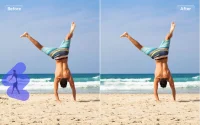
AI Ease Object Remover is a web-based tool that removes unwanted objects from photos using AI-powered inpainting to fill gaps with contextually appropriate imagery.

Remaker-BackgroundRemover is a web-based tool that automatically removes image backgrounds and generates transparent or replacement backgrounds for photos and graphics.